ANDROID AUTO
ON CARLIFE. FREE.
One free app on your phone and a USB cable. No adapter, no license, no activation.
- 100% free
- No license key
- No adapter
- Open source
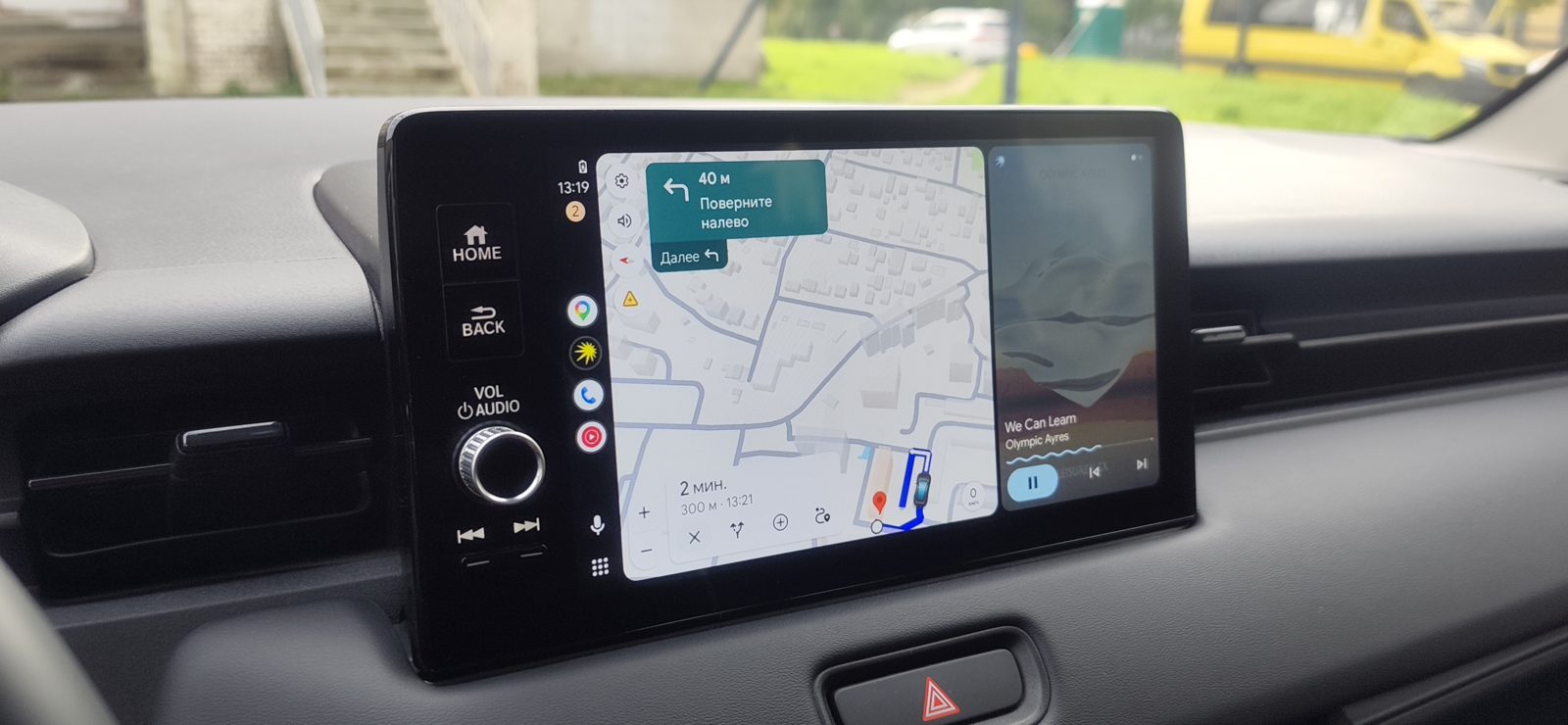
أندرويد أوتو على شاشة بايدو كارلايف — مجاناً
Headswap تطبيق مجاني لهاتف أندرويد يعرض Android Auto الحقيقي على الشاشة الأصلية للسيارة التي تدعم Baidu CarLife فقط. يعمل عبر كابل USB. بديل مجاني للتطبيقات المدفوعة وللمحوّلات: لا تحتاج إلى شراء محوّل، ولا ترخيص، ولا تفعيل.
- مجاني بالكامل: بدون ترخيص وبدون تفعيل، والكود مفتوح المصدر
- لا حاجة لمحوّل ولا لتعديل نظام الشاشة
- شاشة كاملة مع اللمس، والصوت عبر USB إلى سماعات السيارة
- مُجرّب على سيارات النسخة الصينية: Dongfeng Peugeot 5008, Honda Breeze, Honda CR-V, Honda Vezel, Hyundai Elantra, Hyundai ix35, Jetta VS5/VS7, Kia K3, Kia Sportage Ace, Mazda CX-5, Mazda CX-50, Mitsubishi Outlander, Skoda Kamiq, Skoda Octavia Pro, Toyota Corolla Cross, Toyota Levin, Volkswagen Golf, Volkswagen ID.Unyx, Volkswagen Lamando L, Volkswagen Sagitar, Volkswagen T-Roc, Volkswagen Tharu XR, Volkswagen Tiguan L Pro / Teramont Pro
- المتطلبات: أندرويد 10 أو أحدث مع تطبيق Android Auto، وشاشة أصلية تدعم Baidu CarLife عبر USB
- حمّل ملف APK وثبّته على الهاتف.
- افتح Headswap واتبع خطوات الإعداد حتى النهاية: وضع المطوّر في Android Auto، الأذونات، العمل في الخلفية.
- وصّل الهاتف بالسيارة بكابل USB.
Your car screen only has Baidu CarLife?
Many cars made for China, or imported with Chinese-market equipment, have a factory head unit with Baidu CarLife only: no Apple CarPlay, no Android Auto. You see it in cars like the Toyota Levin, Honda Vezel, Kia Sonet or the Chinese e-Golf. The dealer usually cannot add Android Auto. There are some solutions, but each one has a catch.
Paid apps
Also an app on the phone, but you must buy a license and activate it.
WIZCAR, MyCarPlay and similar
A box in the USB port that turns CarLife into Android Auto or CarPlay. It works, but it is one more device in the car and one more purchase.
Free app on your phone
Full Android Auto with touch, sound over USB to the car speakers. No license, no box, no head unit flashing.
An adapter, but inside your phone
Headswap does the same job as an adapter box, without the box. To the car, it looks like a normal phone with CarLife. To Android Auto, it looks like the car head unit. Everything runs on one phone.
as a CarLife phone
head unit
See it in the car
A minute and a half on a Honda Vezel: plugging in the cable, maps, music, touch and the voice assistant. On-screen captions are in Russian.
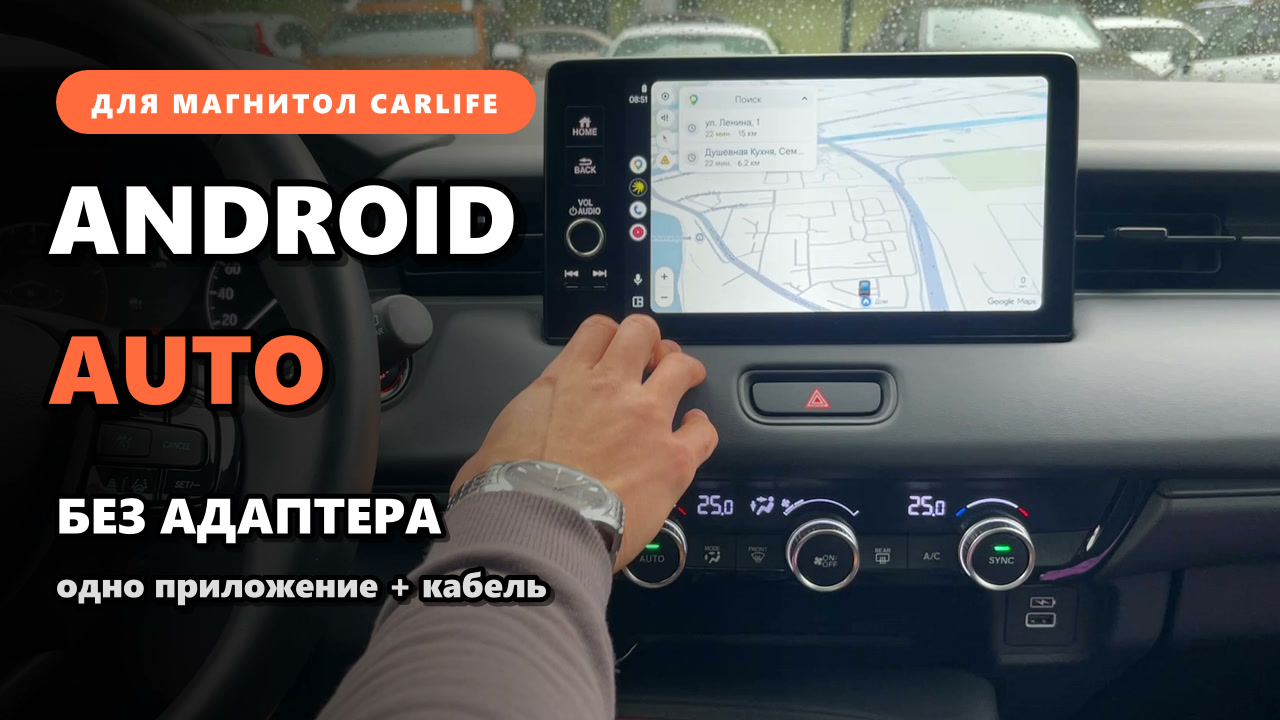
Tested in a real car
- Full-screen picture, touch hits exactly where you tap
- Choose the resolution: 800×480, 1280×720, 1920×1080 and wide 8:3 screens (1280×480, 1728×648, 1920×720)
- Stable video, USB does not drop
- Music and navigation voice over USB to the car speakers, no Bluetooth
- Voice input through the car microphone; the voice button on the head unit opens the assistant
- Messages read aloud with the “Read” button in Android Auto
- Phone calls go through the car head unit when the phone is paired with it over Bluetooth
- Steering wheel buttons change tracks
- Rotary knob on the head unit (Mazda style) moves through Android Auto; Home, Media and Navigation buttons work too
- Head units that check if the CarLife phone is genuine also connect
- The app starts the Android Auto server by itself, also on Vivo phones
- Wireless (beta): no cable, over the car's Wi-Fi or the phone's hotspot. Get in, start the car, and Headswap connects on the car's Bluetooth signal. Tested on Volkswagen
Check before you start
Other cars with CarLife will likely work but are not tested yet. If you try it, please tell us in Telegram which car you have and what happened.
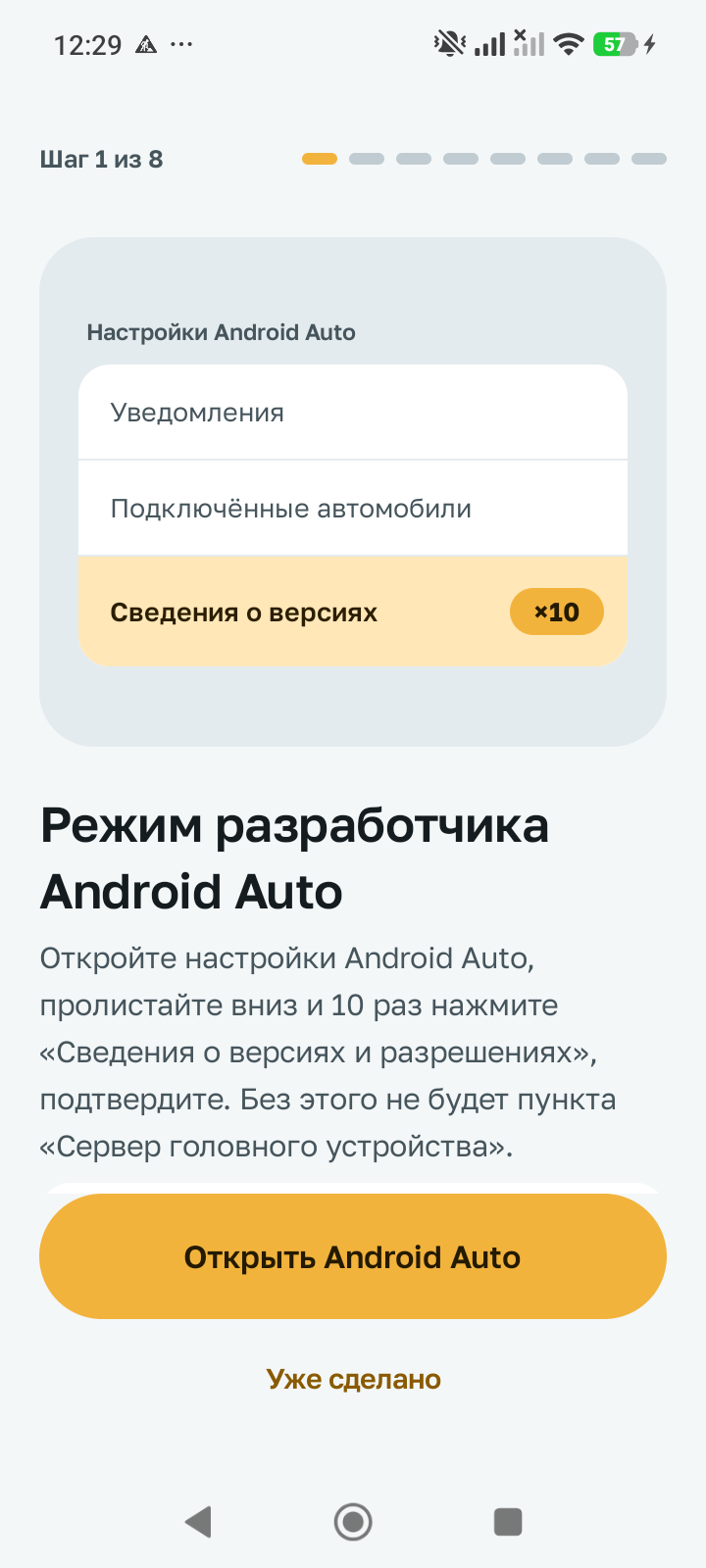
The wizard guides you step by step
- Turn on Android Auto developer mode
- Give permissions: notifications, microphone, location
- Allow background work and remove battery limits
- Connect the phone to the head unit with a cable
The app shows you if the phone is ready to drive. Settings are split into sections: appearance, video (resolution, Android Auto interface scale, frame rate), sound and microphone, head unit, updates and wireless.
Headswap 2.0.0
APK for Android. Free. Install it like a normal app; you do not need to change anything in the car.
Use at your own risk
Headswap is an unofficial app. To make it work you need to turn on things that usually only developers use:
- Android Auto developer mode and its head unit server;
- Android developer options and, if needed, USB debugging;
- an accessibility service and “restricted settings” for an app not from the store;
- background work without battery limits;
- installing an APK from outside Google Play.
The app is provided “as is”, without any warranty. The author is not responsible for any problems with your phone, head unit or car, or for the results of using it. An update of Android Auto, the head unit or the phone can break it at any time. Do not set up the app while driving.
How to install
- Download the APK and open the file. Android will ask to allow installs from your browser — allow it.
- Open Headswap and complete the setup wizard to the end.
- Android Auto developer mode: open Android Auto settings, tap “Version” 10 times, then in the ⋮ menu choose “Start head unit server”. The wizard shows you where.
- Accessibility service (for auto start): if the switch is grey, go to Settings → Apps → Headswap → ⋮ → “Allow restricted settings”, then turn it on again.
- Connect the phone to the head unit with a USB cable. Keep the phone unlocked when you connect.
Updates install over the old version, your settings stay.
What’s new
- 2.0.0. Wireless (beta): Android Auto on a CarLife head unit without a cable, over Wi-Fi. Works with cars that run their own hotspot or join the phone's hotspot; tested on Volkswagen. Pick your car in Settings → Wireless: when the phone connects to it over Bluetooth, Headswap starts waiting for it on its own. Enter the car's Wi-Fi and the phone switches to it by itself while mobile data keeps the internet. Video over Wi-Fi adapts to the link: on drops the quality goes down instead of lag building up. Plug in a cable and USB takes over.
- 1.2.2. Android Auto interface scale: in Settings → Video pick 100 to 280 dpi (higher is larger). Applies on the next connection; at high dpi Android Auto may show a single column instead of the split screen.
- 1.2.1. Settings are split into sections instead of one long list. Each section shows its current values, and problems — autostart service off, no microphone access, update error — are highlighted right away.
- 1.2.0. Multi-touch: zoom and rotate the Android Auto map with two fingers. Works on head units that send the second touch over CarLife (for example, Volkswagen Tiguan L Pro); some head units, including the Honda Vezel, always send a single touch, and there you keep one-finger control.
- 1.1.11. In-app updates: Headswap finds a new version by itself, shows what is new in it and installs it over the current one, your settings stay. You can turn the check off in Settings → Updates. New appearance setting: system, light, medium or dark theme. The 2560×1440 video mode is now marked as experimental in the list.
- 1.1.9. Support for newer Baidu CarLife head units with the updated phone check: the Chinese Honda CR-V 2026 and Mazda CX-50 no longer show "device not authorized" and no longer drop the connection every 30–40 seconds. Fixed a black screen and an endless reconnect loop on some phone and head unit combinations: at 2560×1440 (for example, Huawei Pura 70) and on reconnecting to the Volkswagen Tiguan L Pro. Navigation hints are back on the Honda Vezel instrument cluster; on the Chinese Mazda CX-5 (Desay SV) they stay off so the radio is not muted. Video resolutions in the list are now labeled with the cars they were made for.
- 1.1.6. New video resolution "2240×976" for the Volkswagen Tiguan L Pro (CNS3 head unit) with the large screen: the Android Auto picture fills the whole window between the factory panels and is no longer squashed vertically. Also added an experimental 2560×1440 mode: it works only if the phone can run Android Auto at that resolution, otherwise the screen stays black; then switch back to 1920×1080.
- 1.1.5. For the Chinese Mazda CX-5 (Desay SV) and other head units that switch the audio source themselves: the factory radio no longer goes silent when you open CarLife, including with Bluetooth connected. When the head unit switches to the radio, Android Auto music pauses and does not start by itself when you come back — press play to resume. The track title goes to the head unit only while music is playing, and the connection no longer drops while CarLife is in the background. The problem report now includes a detailed sound and Bluetooth log.
- 1.1.4. Fixed a black screen on Samsung phones with an Exynos chip (for example, Galaxy A55) on older CarLife head units such as Desay SV in the Chinese Mazda CX-5: the video did not show, although sound and the voice assistant worked.
- 1.1.3. First connection when Android Auto is not set up on the phone yet: Headswap no longer closes the Android Auto setup wizard and shows a hint on the car screen and the phone to tap “Continue”, then “OK”, and grant the permissions.
- 1.1.2. No more stripes and flicker when Android Auto starts and the screen goes from the logo to maps and music: video for the head unit is encoded more evenly, without sudden spikes. The Headswap splash screen now dissolves smoothly into the Android Auto picture instead of cutting over. The Exit tile in Android Auto takes you to the head unit's own home screen; when you come back, Android Auto shows its home screen right away, with no black screen until you touch it.
- 1.1.0. The head unit now knows what Android Auto is doing. Navigation hints — the turn arrow, distance to the turn and street name — go to the head unit's native interface. So does what is playing: track, artist, cover art and progress; on head units with a CarLife instrument cluster (for example, Volkswagen Tharu XR) the track also shows on the dashboard. The app interface is now in English and Russian, pick the language in settings. Android Auto server auto start works with any phone language.
- 1.0.12. Stable connection to Volkswagen head units with CarLife 2.1 (Tharu XR and similar): the app no longer loses service messages from the head unit and starts video by itself if the head unit does not send the start command. Fixed a video service crash on some Xiaomi phones when showing the placeholder screen. The developer log now includes the reasons for app crashes.
- 1.0.10. Sound no longer stops when you press Navigation or Media on the head unit. New “Frame rate” setting: Auto, 15 or 30. Video bitrate adapts to USB speed and the frame queue is shorter — less delay on slow head units (in modes with video re-encoding).
- 1.0.8. New video mode “Wide 8:3 medium”, 1728×648 — the native resolution of the Mazda screen.
- 1.0.7. Home, Media and Navigation buttons on the head unit (Mazda style) work in Android Auto.
- 1.0.6. Head units that check if the CarLife phone is genuine now work (tested on Volkswagen Tharu XR 2026). Android Auto server auto start on Vivo with Android 16.
- 1.0.5. Fixed a crash at start if Android has not yet given USB access.
- 1.0.4. Wide screens: touch is exact, new 1920×720 mode.
- 1.0.3. Resolution choice in settings: 800×480, 1280×720, 1920×1080 and wide 8:3.
- 1.0.2. Rotary knob on the head unit (Mazda style) moves through Android Auto.
- 1.0.1. Voice button on the head unit opens the Android Auto assistant. Android Auto server starts more reliably after connecting.
Supported cars
| Car | Market | Baidu CarLife |
|---|---|---|
| Dongfeng Peugeot 5008 2024 | China | — |
| Honda Breeze, 2nd gen | China | — |
| Honda CR-V, 6th gen, pre-facelift | China | — |
| Honda CR-V 2026 1.5T | China | 2.0 |
| Honda CR-V 2026 hybrid works with some limitations | China | — |
| Honda Vezel 2022–2024 (GAC Honda) | China | 2.0 |
| Hyundai Elantra, 7th gen, pre-facelift | China | — |
| Hyundai ix35 2021 | China | — |
| Jetta VS5/VS7 Baidu CarLife version only, J-Link version is not supported | China | 2.0 |
| Kia K3 2023 | China | — |
| Kia Sportage Ace | China | — |
| Mazda CX-5 2025–2026 | China | 2.0 |
| Mazda CX-50 | China | — |
| Mitsubishi Outlander 4 2022 | China | — |
| Skoda Kamiq GT 2021 | China | — |
| Skoda Octavia Pro | China | 2.0 |
| Toyota Corolla Cross 2024–2025 | China | 2.0 |
| Toyota Levin | China | — |
| Volkswagen Golf 8 Pro 2021 | China | — |
| Volkswagen ID.Unyx | China | — |
| Volkswagen Lamando L | China | — |
| Volkswagen Sagitar 2021–2022, pre-facelift | China | 2.0 |
| Volkswagen T-Roc facelift 2026 | China | — |
| Volkswagen Tharu XR 2025–2026 | China | 2.1 |
| Volkswagen Tiguan L Pro / Teramont Pro | China | — |
Your CarLife car is not in the list? Try it and send the model, year and CarLife version in Telegram — we will add it.
Questions? Ask in Telegram
News, updates and help are in the Telegram channel. Write your car model, head unit and phone, and what does not work — it helps to fix it faster. English is fine.
Support the project
Headswap is free and will stay free. If it saved you money on an adapter or a license, you can say thanks with a small donation. It is optional.
Send Stars in Telegram
Coming soon
USDT
address coming soon
Common questions
Is Headswap really free?
Yes. There is no license key, no activation and no paid version. The source code is open on GitHub under GPL-3.0.
How is it different from WIZCAR or MyCarPlay adapters?
An adapter is a separate box that plugs into the head unit and pretends to be a CarLife phone. Headswap does the same thing on your phone: you only need a USB cable, there is no extra device in the car.
Can I get Android Auto on a head unit that only has Baidu CarLife?
Yes. Headswap connects to the head unit over USB as a CarLife phone, and works as a head unit for Android Auto on the same phone. You get full Android Auto with touch on the car screen.
Do I need to flash anything in the car?
No. The head unit stays as it is. Everything works through the app on your Android phone and a USB cable.
Does the sound go over Bluetooth?
No. Music and navigation voice go over USB to the car speakers. Bluetooth is only needed for phone calls.
Will it work on my Toyota Levin, Kia Sonet or e-Golf?
If the factory screen has Baidu CarLife over USB, there is a good chance. It is tested on several Chinese-market cars — see Supported cars. Try it and tell us the result in Telegram.
Android Auto, Baidu CarLife, WIZCAR and MyCarPlay are trademarks of their owners. Headswap is not affiliated with Google, Baidu, car makers or adapter makers.